Format text in checklists
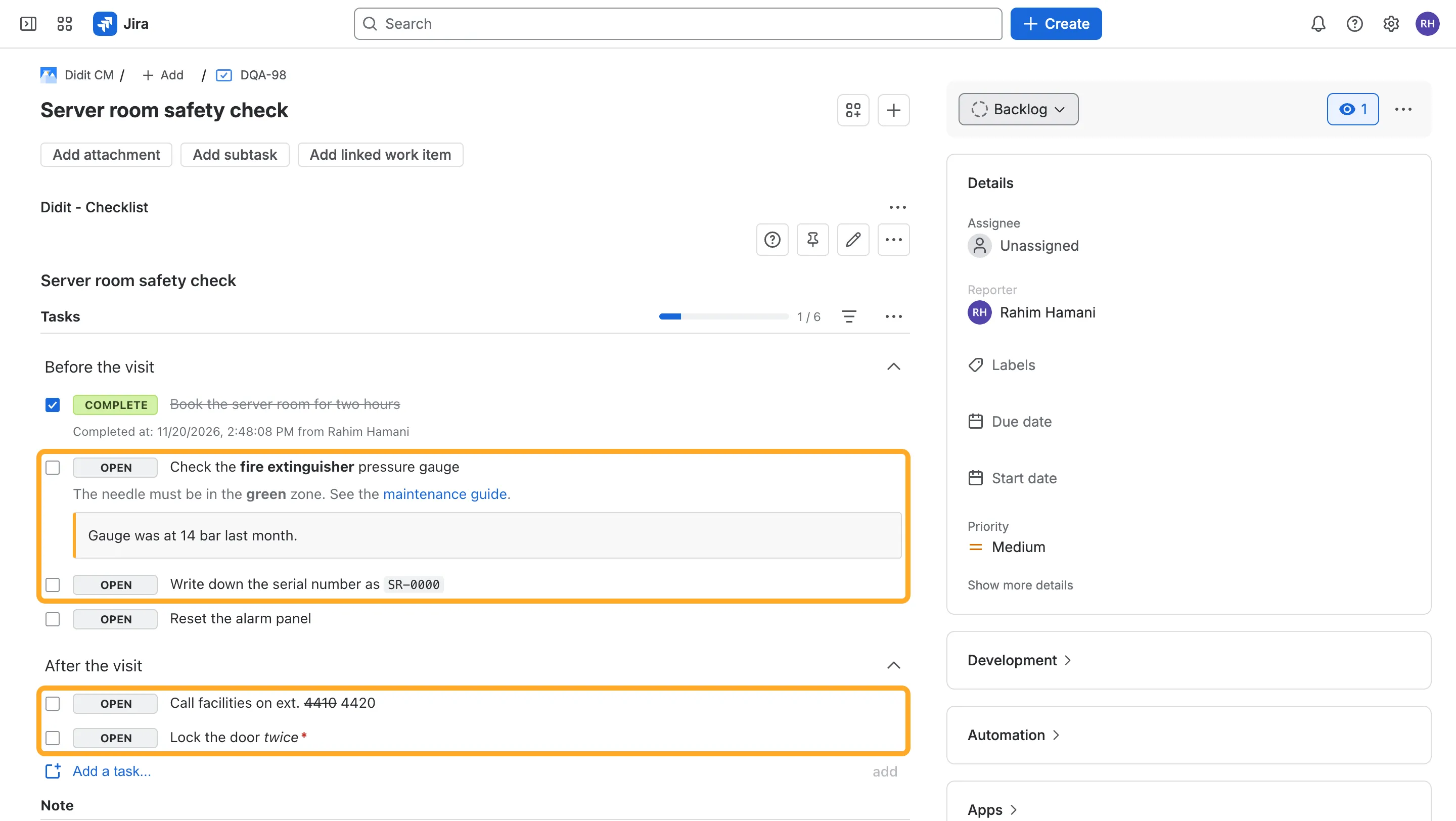
Make the words that matter stand out. Type a few marks around them, and Didit shows them formatted in Jira, in Confluence and in the Didit hub.
The marks
| You type | You get |
|---|---|
**fire extinguisher** | fire extinguisher |
*twice* or _twice_ | twice |
~~4410~~ | |
`SR-0000` | SR-0000 |
[maintenance guide](https://example.com) | A link that reads “maintenance guide” |
- Right around the words:
**bold**works,** bold **doesn’t. - Not inside a word:
snake_case,2*3*4and*.logstay as you typed them. - Combined:
**_bold and italic_**. - Links go to an address that starts with
https://orhttp://. A web address on its own is a link without any marks. - Show a mark as typed with a backslash in front:
\*not italic\*shows its asterisks. In a path likeC:\temp\*.logthe backslash stays.
Where you can format
- Task and heading titles
- The description of a task, a heading or the whole checklist
- Task notes and the checklist note
- Templates: every checklist made from the template shows the same formatting
The names of checklists and templates stay plain. People who open a checklist through a public link see the formatting too, and a named link there also shows where it goes: “maintenance guide (example.com)”.
These fields have no toolbar, so type the marks. For buttons, open the checklist with Edit as text.
Where the text stays plain
- The PDF export, emails and Didit’s Jira fields show the words without the marks. A named link is followed by its address.
- The mobile app shows the marks as you typed them.
Good to know
Why does a text I never formatted look formatted?
A text that already held a complete pair of marks, like
**important**, is shown formatted now. Checklists imported from other apps often hold them. How do I show the marks themselves?
Put a backslash in front of each one,
\*\*not bold\*\*, or put them in code: `**not bold**`. Do validators and automation rules still find a task by its title?
Yes. They compare the words, not the marks. A rule that names “Deploy to prod” also finds the task
**Deploy** to prod.